What you need to know about Staying safe from online scams
How can I make the most of my appointment with a healthcare provider?

Get you to act quickly on fear by telling you someone you know is in trouble and needs your help

Pretend to be a person or company you trust and send you a link that takes you to a fake website

Tell you an online purchase has been denied or a delivery service like USPS has a package you ordered and can’t find your address

Trick you into thinking they will give you a lot of money if you give them your information

What do boundaries look like?
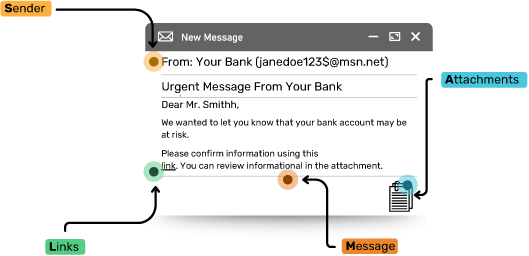
Sender
Scam emails may
come from strange
or unknown email
addresses.
For example, an email
from your bank shouldn’t
begin with random words
and numbers like
yourbank!3 or
janedoe123$ and
shouldn’t end with
things like @gmail.com,
@hotmail.com, or
@msn.net
Links
Scam emails often have links that, if clicked on, will steal your information.
Attachments
Scam emails often contain attachments that if opened can release a virus or steal your information. Don’t open attachments in emails from people you don’t know.
Message
Scam emails may contain mistakes or not make complete sense.
Scammers may also try to...
Use social media or dating apps to:

Pretend to be someone they are not on a dating app or website to take advantage of you (also called catfishing)

Say they will send you money if you give them your bank account information

Ask for your phone number in order to create fake accounts on various apps and ask for verification codes sent to your phone to finish creating the account

Tell you they need financial help and ask you to send them money
Red flags to look out for on dating apps and social media:
- Their photos show up on multiple profiles, sometimes with different names
- They say they are in love with you very quickly, sometimes before even meeting you in-person
- They begin asking for money or your information - they may say a family member is sick or they are stuck somewhere and need help
- They message you more than usual and begin to push you to respond to them or they send angry messages if you do not respond
Hack your passwords to gain access to your accounts
Here are some password tips to keep your account safe:
- Use strong passwords, with as many different types of characters as you can (upper and lowercase, numbers, symbols)
- Avoid using personal information (name, pets, anything shared on social media)
- Get creative: You could use the first letter of each word in a phrase or quote
- Use 2 factor authentication, which requires you to provide 2 ways to identify yourself, such as a password and a text message
- Do not share your passwords with others
- Use different passwords for different accounts
- If you notice weird activity on your account or get a notification your password has been compromised, update it
- Use a password manager to keep track of passwords in a safe way
Use your credit cards for online purchases
Here are some credit card tips to keep your finances safe:
- Use a credit card with a low limit and avoid using debit cards
- Get a free credit report each year through the three official credit report agencies: Equifax, Experian, and TransUnion